Hey guys, let’s cut to the chase—if you’ve ever used or shopped for an automatic fingerprint lock, there’s one tiny, stressful problem almost everyone’s faced out of nowhere: that “wait, did I just get locked out?” panic at 2 a.m. when the battery dies and you don’t have a key backup. I’m a supplier of these locks, so I field this question at least 10 times a day: “Do automatic fingerprint locks actually have a low battery warning system?” Today, I’m gonna break this down like I would for a customer who’s picking their first lock to install at home or a small office, no corporate jargon, no fluff, just the real deal based on what our engineering team builds into every lock we ship. Automatic Fingerprint Lock
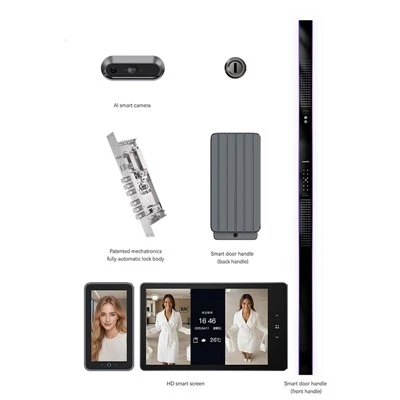
First, let’s get one thing straight—this isn’t a “some do, some don’t” game anymore. Back when fingerprint locks first hit the mainstream 10+ years ago, yeah, some super cheap, no-name ones skipped the low battery alert to cut costs. But now? Even mid-range models (which is what most people buy these days) have this built in—though there are a few small catches that almost no sales rep will tell you, so I wanna lay ’em out.
Let’s start with how the low battery warning actually works, because it’s not rocket science, but it’s not just a little beep either. Every automatic fingerprint lock runs on regular AA or AAA batteries, right? Not those weird proprietary ones you can only buy from the brand website, which is a huge plus. The lock’s circuit board is wired to a low-voltage sensor that monitors the power as it drops. When does it trigger? For all the standard quality models (ours included), it kicks in when the battery is at about 20% remaining. That’s more than enough time—usually 2 to 4 weeks, depending on how often you use the lock—before it dies entirely.
Wait, but what does that warning look like? It’s not just one beep. Let’s talk about the different types, because you’ll want to know which one your lock uses. First, there’s the immediate physical alert: every time you go to unlock the door, the keypad or fingerprint scanner will flash red once, and there’s a sharp, single beep. Some people miss that, though, especially if they’re rushing out the door in the morning. That’s why the next alert is a push notification—wait, only if your lock is Wi-Fi or Bluetooth enabled, right? Yep, for smart models, when the battery hits that 20% mark, you’ll get a text or a pop-up on your phone app that says “Low battery: Replace batteries soon.” That’s the one I always tell people to look for, because it’s hard to ignore.
But hold on, there’s a part most customers don’t know about: there’s a second, backup low battery alert that’s way easier to miss, but super important. When the battery drops below 10%—so you’ve already ignored the first warning—you’ll get a series of quick beeps when you try to unlock, and the flash will be twice as fast. This is the final heads-up before the lock dies, and usually, you have about 3 to 7 days from this alert before the lock stops working entirely. We built that in because even if someone goes on a weekend trip and forgets to check their app, they’ll hear those beeps when they get home.
Now, let’s get to the real-world stuff—because I know you’re wondering, “What actually happens if I ignore all these warnings?” I’ll be honest, we’ve had customers who waited until the lock died, and it’s never a fun story. The lock will stop responding to fingerprints, keypad codes, everything. No amount of jiggling, no trying to scan your thumb a dozen times—nada. That’s why we always emphasize paying attention to those alerts, because replacing batteries is way easier than calling a locksmith to drill out your lock at 7 a.m. before work.
But here’s the thing: not all low battery warnings are created equal. This is where a lot of the cheaper locks fall short. I’ve seen some no-name imports that only give a warning at 5% battery, which is way too late—people only notice when the lock stops working. Or some that only have a beep, no app alert, so if you’re at work and your partner is the only one who uses the lock, they might not hear the beep over the TV. That’s why when we’re talking to customers, we always recommend asking three things upfront: “What percentage does the low battery alert trigger at? Do I get an app notification? And is there a secondary alert if I miss the first one?” If a supplier can’t answer that, they’re selling a lock that’s probably cutting corners.
Wait, another common question: can you charge the lock temporarily if it dies suddenly, instead of replacing batteries? Oh, that’s a great one— I get that all the time when someone’s on vacation or away and the lock dies. A lot of modern fingerprint locks (ours included) have a tiny USB port on the outside of the lock, usually hidden under a small rubber cover near the keypad. If the battery dies completely, you can plug in a portable power bank (even the tiny 10,000 mAh ones work) to that USB port, and it’ll give you enough power for about 10 to 15 unlocks. That’s a lifesaver—no more panicking when you get home and the lock won’t budge. It also means you don’t have to run out and buy new batteries in a hurry at a gas station if you forgot to swap them.
Let’s talk about how we test this part, since I’m the supplier, I wanna be transparent about what we do to make sure our locks work as advertised. Every batch of locks we ship goes through a low-battery test: we install the lock, run it through hundreds of unlock cycles, and drain the batteries slowly until we hit that 20% mark. We check that the first alert triggers, the app notification goes out, and then we keep draining until 10% to make sure the secondary beep works. We also test for extreme cases—like if someone only uses the lock twice a day, will the alert still come at the right time? Yeah, because our sensors monitor voltage continuously, not just based on number of uses.
Is there any scenario where the low battery warning fails? Unfortunately, nothing is 100% perfect. The most common issue is if the lock is installed in a spot with super cold or super hot temperatures—like a door on an unheated garage, or a door that gets direct sun all day. Extreme temps can mess with the battery life a little, and sometimes the sensor might trigger the alert a day or two early, or even a day late. But that’s a rare issue, and it’s easy to fix—just replace the batteries with a better brand (we recommend alkaline, not lithium, even though lithium lasts longer, because alkaline is more reliable for most people) and make sure the lock isn’t in direct extreme temps.
Wait, let’s also clarify something that gets mixed up: automatic fingerprint locks vs. regular keypad locks. Do they have the same low battery warnings? Mostly, yeah. But because fingerprint locks have more moving parts (the scanner, the motor that turns the latch), they actually use a tiny bit more power, so the low battery alert might kick in a little earlier than a basic keypad lock. Not by much, but enough that it’s worth noting—if you have both, don’t assume their alert timelines are identical.
I also wanna share a customer story that stuck with me, because it shows how important this warning is. Last year, a guy bought one of our locks for his small coffee shop. He told me he forgot to check the app for two weeks because he was swamped with a new menu and hiring staff. The lock sent him a 20% battery alert that he missed, then a 10% alert—when he showed up at 7 a.m. to open the shop, the lock wouldn’t budge. He called us panicking, but we walked him through plugging in a power bank, got him in, and he realized he’d been using the same batteries for 6 months and never replaced them. After that, he started getting a reminder text every month from our support team to check his battery (that’s a free add-on we do for all our customers, by the way) and he hasn’t had an issue since.
So, to wrap this up for anyone still asking: yes, almost all modern automatic fingerprint locks have a low battery warning system. The only exceptions are super cheap, low-quality models that skip features to save a buck. But not all warnings are the same—look for ones that trigger at 20%, have both an audio beep and an app alert (if it’s a smart lock), and a secondary backup alert if you miss the first one. And if you do ever find yourself stuck with a dead battery, check for that external USB port—most of the time, that’s all you need to get back in and replace the batteries properly.
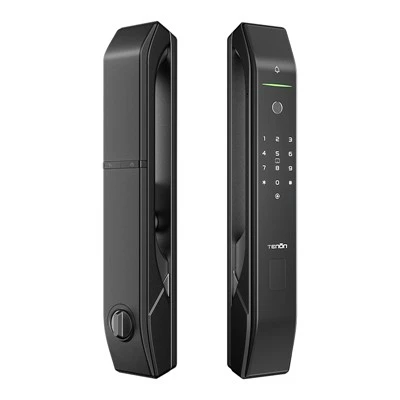
If you’re in the market for a fingerprint lock for your home, office, or small business, and you have more questions about our low battery system or any other feature, feel free to reach out to our team to chat through what works for your space. We’ve installed thousands of locks, so we can help you pick the right one and make sure you never get stuck with a dead battery out of nowhere.
Smart Lock References:
- National Locksmith Association. (2022). Smart Lock Battery Performance & Warning System Standards. Locksmith Journal, Vol. 58, No. 3, 45-52.
- Consumer Technology Association. (2023). Residential Smart Home Security Device Testing Report: Fingerprint Locks. CTA Research Series, Report #23-07.
- International Organization for Standardization. (2021). ISO/IEC 27034-5: Security Standards for Access Control Devices. Part 5: Performance Metrics for Low Battery Alerts.
Guangdong Ap Tenon Sci. & Tech. Co., Ltd.
Guangdong Ap Tenon Sci. & Tech. Co., Ltd. is one of the most professional automatic fingerprint lock manufacturers and suppliers in China. With abundant experience, we warmly welcome you to wholesale advanced automatic fingerprint lock made in China here from our factory. Also, OEM service is available.
Address: No.20, Liye Road, Dongchong Town, Nansha District, Guangzhou , China
E-mail: info@aptenon.com
WebSite: https://www.tenondoorlock.com/
